.
.
.
.
.
.
.
.
.
.

Notre Dame Parents
Logins
List of 8 items.
-
Blackbaud Tuition Management
Click Here to Access Blackbaud Tuition Management***Uses Single Sign On (SSO) synced with your myNDHS information.***
Current parents who need assistance with completing the registration or making an online payment should reach out to the NDHS Business Office at studentbilling@ndhs.org.Questions regarding the Tuition Assistance process or questions related to the Tuition Assistance application should be directed to the NDHS Business Office at financialaid@ndhs.org.Three (3) methods to pay:1. Online
Blackbaud Tuition Management by credit card (3% fee), or checking account # (no fee)2. CallBlackbaud Tuition Management
888-868-8828(Blackbaud Customer Support: 1.800.468.8996)3. Mail the check directly to BlackbaudBlackbaud Tuition ManagementPO Box 54228Los Angeles, CA 90054-0228 -
Canvas - Parent
Click Here to Canvas - Parent***Uses Single Sign On (SSO) synced with your myNDHS information.***
Notre Dame teachers use Canvas to manage gradebooks and course content, allowing students to submit assignments, view course materials, check class calendars, and view current class grades.
(For official grades for the term, please grade reports and transcripts in the myNDHS portal.)
Parents:
1) Through the app, you can download it to your smartphone or tablet.
2) For Canvas technical support, email canvas@ndhs.org -
Magnus
Click Here to Access the Magnus Health Portal
***Uses Single Sign On (SSO) synced with your myNDHS information.***
Having trouble logging into Magnus:
Contact Magnus support at (877) 461-6831 or by email at service@magnushealthportal.com.
The Magnus support staff will assist with completing Magnus requirements, including submitting forms.
Click Here to Download a Physical Education Form.
***Notre Dame must have a current, up-to-date physical form to participate in any sport or activity.***
Click Here for Immunization and Health Requirements -
myNDHS
Click Here to Access myNDHS (also known as Blackbaud)
***Uses Single Sign On (SSO) synced with your myNDHS information.***
myNDHS serves as the primary point for all household and student information. Under the resource board section, students and parents access requirements set by the department, such as retreat information.
If you need to update any information (e.g., email address, physical address, etc.), email familyupdates@ndhs.org -
ND Bookstore
Click Here to Access the ND Bookstore
***Uses Single Sign On (SSO) synced with your myNDHS information.***
If you have any questions, contact your teacher.
2026-2026 Course Materials will be available on the ND Bookstore on August 3, 2026. -
PARENTSQUARE
-
SCOIR | Counseling
Click Here to Access SCOIRSCOIR is an online program our counseling department uses to help students plan and prepare for post-secondary goals. It provides college information and other services, such as free test prep, college searches, scholarship information, and college advising.
SCOIR is also the place where seniors list their college application choices and make letter(s) of recommendation requests.
This is a great tool for parents and students to use to keep track of colleges and universities. Feel free to contact a teacher or counselor if you have questions.
If you do not know who your counselor is, email counselors@ndhs.org for more information. -
Uniforms
Info List
List of 9 items.
-
ATTENDANCE
New Attendance Reporting Procedures:Parents must now submit the attendance through Blackbaud (myNDHS) by 9 am each day for absences, tardies, and early dismissals.
Please review these typed instructions to understand how to submit attendance this year.
Videos:attendance@ndhs.org if you have any questions.
The Attendance Office staff, Ms. Lia Shaw or Ms. Veronica Robledo, may email parents for follow-up documentation as needed. A doctor's note is required for any absences that exceed 3 or more days or if a student exceeds their absence limit in any class. Cooperation is essential for accurate student tracking.
Absence Limits:Our policy allows up to 8 absences per semester per class; exceeding this will result in an attendance review, requiring a meeting with the family to review necessary interventions. These interventions include an attendance contract, a grade penalty, loss of partial or whole credit, and/or withdrawal from Notre Dame.
For chronic conditions that parents become aware of that may cause frequent absences, please proactively schedule a meeting with the Dean of Women, Christina Phillips, by emailing phillips@ndhs.org.Extended Absence Procedures:Extended absences (4 or more days) should be carefully considered as they can impact student success. Any planned extended absences (4 or more days) must be requested at least 2 weeks before the first absence date by completing this form. Please review the 2026-27 Student-Parent Handbook for further information and restrictions on extended absences. -
Bell/Block Schedule
Click Here to Access the Bell/Block Schedule
The Notre Dame High School daily schedules are governed by the Bell/Block Schedule.
This schedule describes the class times, x-periods, break times, Mass schedule, and other special times scheduled throughout the school.
The NDHS daily schedule is divided into Blue and Gold Days. Click above for the bell/block schedule, or click on the Academic Calendar to view the schedule for any given day. -
Bus Transportation Routes
-
Cafeteria
-
Daily Announcements
-
Parent Involvement
-
Parent Newsletter
-
School Calendars
-
Student-Parent Handbook
myNDHS
List of 5 items.
-
1. Access myNDHS
Click Here to Access your myNDHS ProfileLog in to myNDHS to do the following:- Update your household and student information
- See your student's calendars (classes and activities)
- Access Parent Specific Resources and Forms
- Add additional emails to your myNDHS profile
- Change your email
- Add/change emergency contact information
-
2. myNDHS Tech Support
myNDHS Support
myndhs.support@ndhs.org -
3. What is myNDHS
myNDHS serves as the primary point for all household and student information. Under the resource board section, students and parents access requirements set by the department, such as retreat information.
If you need to update any information (e.g., email address, physical address, etc.), email familyupdates@ndhs.org with your changes.
Updates made here will populate into the other Notre Dame systems, such as Canvas, SCOIR, Constant Contact, and ParentSquare.) -
Update your household and student information
To update your household or student information, please email familyupdates@ndhs.org -
Update your emergency information in myNDHS
List of 1 items.
What Is?
List of 10 items.
-
Blackbaud vs. myNDHS
The terms 'myNDHS' and 'Blackbaud' are used interchangeably and refer to the same platform.
Phrases used and heard:
myNDHS profile = Blackbaud profile
Update your myNDHS profile = update your profile in Blackbaud -
Bus Transportation
-
Canvas vs. myNDHS
Canvas is Notre Dame's Learning Management System (LMS) platform.
Notre Dame teachers use Canvas to manage gradebooks and course content, allowing students to submit assignments, view course materials, check class calendars, and view current class grades.
myNDHS (also known as Blackbaud) is Notre Dame's School Information Systems (SIS) platform, where the school houses the database for household and student information. -
Carpooling
If you are interested in carpooling, please fill out this form:
https://forms.gle/1DwA4Rc6mpkF331C9
Notre Dame will compile and send out the list of interested parties. Please be advised that carpooling agreements are not managed or coordinated by Notre Dame.
Families enter into agreements out of their own accord. Any issues that may arise must be settled between each other. Notre Dame does not assume any liability or responsibility.This form is for informational purposes only. Notre Dame is only facilitating communication between interested parties. -
Course Requests
Course approvals and change requests only happen once per semester. (Notre Dame is no longer accepting course change requests for 2026-2027.)
To see your course approvals:- Log in to your MyNDHS portal
- Go to “Course Requests”
- See your course list for 2026 - 2027
Requesting Course Changes (time to request course changes has concluded)The course change request process differs for current students in grades 9, 10, and 11 and for incoming freshmen.Please use the link for your grade level and read the instructions carefully before requesting any course changes. Please follow the instructions in the documents.To prevent oversight of your desired change, course request changes are not accepted via email or phone call.
If you have further questions regarding course changes, please contact Mrs. Laurel Harris, VP of Academic Affairs at harris@ndhs.org. -
Grade Pulls
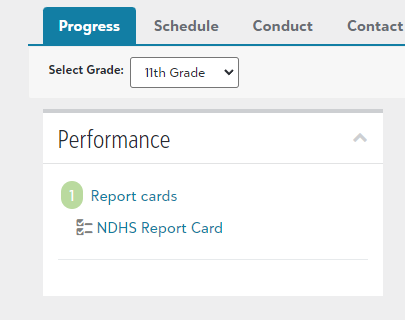
Please log in to your MyNDHS profile to view your child's grade report.How do you view the grade pull?- Upon logging in to the myNDHS portal, click your student's name in the top left.
- Under the progress tab for your student, there will be a tile called "Performance" with a link to "Report Cards."
- Click on "Report cards" to show "NDHS Report Card," and once you open the "NDHS Report Card," you will see the grade pull for your student.
 If you have any questions regarding your student's grades, please email:Mrs. Laurel HarrisVP of Academic Affairs
 -
Parking at Notre Dame
2026-2027 On-Campus Parking for Rising SeniorsRising Seniors (Class of 2027) will receive an email with a form link to sign up for on-campus parking spots in early May. Sign-up is first-come, first-served. Students who had mall parking this year will be guaranteed an on-campus parking spot. These spots are $550 for the year. If your child is not driving until the second semester, they will not be assigned a spot until they register later. Parking assignments will be emailed to students' emails by August 7th. Parking stickers will be distributed at the Senior class meeting during the first week of school.2026-27 Mall Parking for Rising JuniorsRising Juniors (Class of 2028) were sent an email with a link to a form to sign up for mall campus parking spots (located directly behind the Bank of America) in early May, sent to their ndhs.org email account.
The charge for those reserved spots will be $325 for the year. Students who purchase mall parking are guaranteed an on-campus parking spot during their senior year.
If your student is not driving until the second semester, they will not be assigned a spot until they register later.
Parking stickers and placards for mall parking will be distributed at the Junior class meeting during the first week of school.2026-2027 Street ParkingStudents who drive to school without a reserved spot will need to register once school starts and pay the $50 registration fee.
The registration form provides guidance on where students are allowed to park on campus; for example, students are not allowed to park on Morrison or Ventura Canyon.Please contact Mr. Kevin Rinder at transportation@ndhs.org if you have any questions. -
Review Semester Grade Report
Please log in to your myNDHS account to view your child's semester grade report.How do you view Semester Grades?Upon logging in to the myNDHS portal, click your student's name in the top left.Under the progress tab for your student, there will be a tile called "Performance" with a link to "Transcripts."Click on "Transcripts" to show "Unofficial Transcript," and once you open the "Unofficial Transcript," you will see the semester grades for your student.***Per the Student/Parent Handbook, students must dispute a semester grade within one week of release.***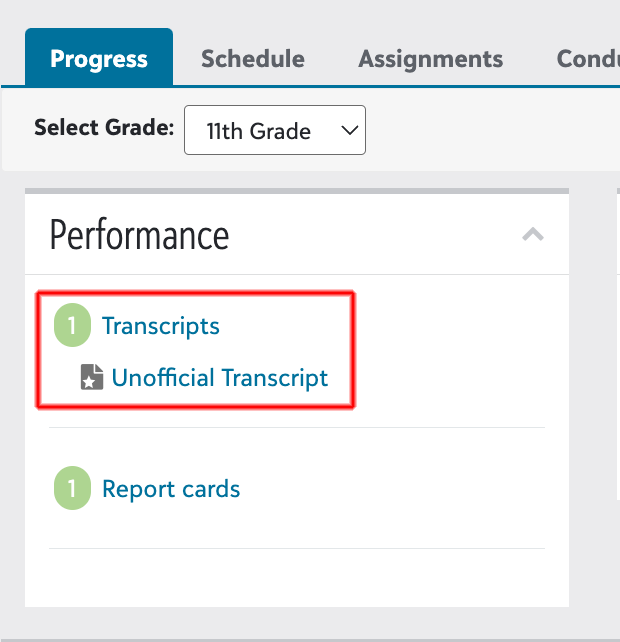 If you have any questions regarding your student’s grades, please email:Ms. Laurel HarrisVP of Academic Affairs
 -
Single Sign On (SSO)
Single Sign-On (SSO) is an authentication method that allows users to securely access multiple separate applications or websites using a single set of credentials (username and password).How It WorksInstead of verifying your password at every single app, SSO relies on a trusted central system known as an Identity Provider (IdP). In Notre Dame’s case, myNDHS (also known as Blackbaud)- Login: You log in to the central platform
- Verification: The IdP verifies your credentials and creates a secure digital key (token).
- Seamless Access: When you visit other connected apps, they check with the IdP, recognize your active login, and grant access without asking for your password again.
The Main Benefits- Convenience: Eliminates "password fatigue" caused by trying to remember dozens of passwords.
- Increased Security: Because you only have to manage one set of credentials, users are more likely to use strong, complex passwords and enable Multi-Factor Authentication (MFA).
- Fewer Tech Tickets: Users are locked out of accounts less frequently, reducing the burden on IT help desks.
-
Work Permits
If you are interested in working before age 18 and need a work permit, please follow the steps below. Once you have completed the steps, go to the Notre Dame High School Main Office to submit for signing.How to Get Your California Work PermitStep 1: Get a Job Offer
Before a permit can be issued, you must find an employer willing to hire you and agree to specific working conditions.- Section 1: You and your parent/guardian must fill out and sign the minor's information section.
- Section 2: Your employer must detail the job duties, hours, wage, and location, and sign the form.
Step 3: Submit to Your School
Take the completed B1-1 form to your school’s counseling office, work experience coordinator, or school district office. The school will review your academic eligibility (e.g., minimum GPA and attendance) and issue the official Permit to Employ and Work (CDE Form B1-4).Important Age Restrictions & Rules- 14 & 15-Year-Olds: When school is in session, you can work a maximum of 3 hours per school day and 18 hours per week. When school is out, you can work up to 8 hours a day and 40 hours per week.
- 16 & 17-Year-Olds: You can work up to 4 hours on school days and 8 hours on non-school days.
- Exemptions: Work permits are not legally required if you are doing casual work like babysitting, yard work in private homes, or delivering newspapers.
For more details on laws, requirements, and downloadable paperwork, visit the California Department of Education Work Permits Guide.
Working with the Entertainment Industry
If you need a work permit relating to the entertainment industry, please contact Ms. Jean Mitchell, Registrar, at mitchell@ndhs.org for more information.
Need Help?
List of 6 items.
-
Admissions
-
Athletics
-
Attendance and Health
To Report Absences, Late Arrivals, and Off-Campus Permits, log in to myNDHS:
Click Here to View Instructions to Report Attendance
Click Here to Access the Magnus Health Portal
Having trouble logging into Magnus:
Contact Magnus support at (877) 461-6831 or by email at service@magnushealthportal.com. -
Business Office
Business Office / Tuition
studentbilling@ndhs.org
Financial Aid
financialaid@ndhs.org
Click Here for More Info on Financial Aid -
Not Receiving Emails?
If you have not received ND emails or feel that you are missing emails, contact engagement.support@ndhs.org -
Tech
Technology Supporttechnology.support@ndhs.org
myNDHS Support
myndhs.support@ndhs.org
Canvas Support
canvas.support@ndhs.org
SCOIR Support
iPad Support
ipad@ndhs.org
ND Used Apps
List of 5 items.
-
Canvas
-
EZ School Pay
Download our Mobile Phone Apps
EZSchool Pay | Cafeteria (iPhone)
EZSchool Pay | Cafeteria (Android)
Keep track of your student's account at the Notre Dame High School cafeteria.
If you have any questions, please email cafeteria@ndhs.org. -
GoFan
Download our Mobile Phone Apps
GoFan | Buy Tickets (iPhone)
GoFan | Buy Tickets (Android)
You can also go to www.gofan.co and search for 'Notre Dame High School' on your desktop to purchase tickets to sports games and other school events. -
Mobile ND Athletics
Download our Mobile Phone Apps
Notre Dame Athletics Sports App (iPhone)
Notre Dame Athletics Sports App (Android) -
ParentSquare
iOS App: Apple App Store
Android App: Google Play Store
How to's
List of 5 items.
ND Digital Channels
List of 2 items.
-
Social Media
Follow us on Social Media
Facebook
notredamehighschool -
Website
If you have any suggestions on what you would also like to see on this page, email info@ndhs.org.
A College Preparatory School of Excellence
13645 Riverside Drive
Sherman Oaks, CA 91423
(818) 933-3600 Main Office
info@ndhs.org
Office Hours
7:30 am - 3:30 pm M-F
Office Closed to Visitors at 3:30 pm
Click Here to Contact Faculty/Staff
Sherman Oaks, CA 91423
(818) 933-3600 Main Office
info@ndhs.org
Office Hours
7:30 am - 3:30 pm M-F
Office Closed to Visitors at 3:30 pm
Click Here to Contact Faculty/Staff
Absences, Late Arrivals,
Off-Campus Permits
Log in to myNDHS to Report
***Do not call***
Click Here for Instructions to Report Attendance
Attendance Office Hours
7:30 am - 3:30 pm M-F
Off-Campus Permits
Log in to myNDHS to Report
***Do not call***
Click Here for Instructions to Report Attendance
Attendance Office Hours
7:30 am - 3:30 pm M-F
.
©2026 Notre Dame High School. All Rights Reserved. | Privacy Policy | WCEA Accreditation | Mission and Statement |
Congregation of Holy Cross | DEI Commitment
Congregation of Holy Cross | DEI Commitment